Custom development and solutions
Barcode goods entry in PANTHEON
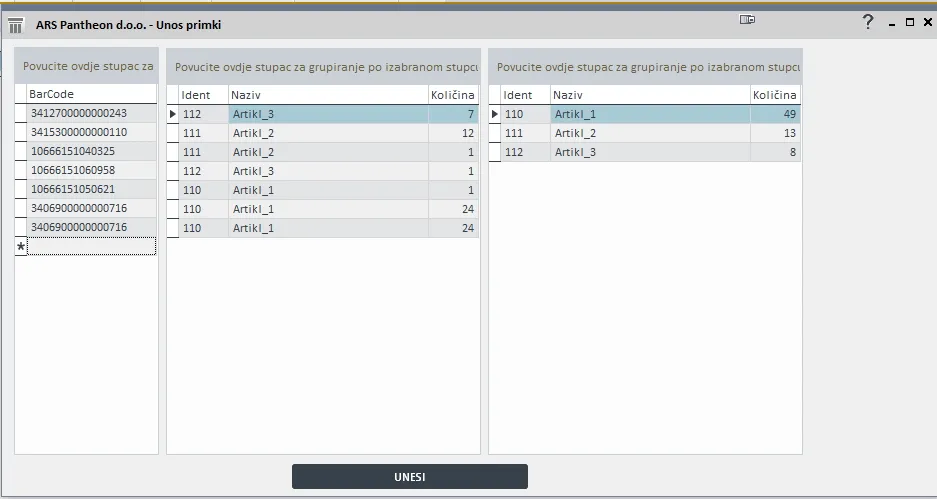
Barcode entry is a module for quickly creating a goods receipt in PANTHEON. You scan one item at a time or, if the box has its own barcode, the whole box at once, which makes receiving goods faster. The module recognises whether a barcode is for a single item or a multi-pack and enters the quantity.
How it works
A receipt is created by scanning barcodes. Two ways are possible, depending on the goods:
- item by item: each scanned barcode enters one piece,
- whole-box barcode: if the box has its own (multi-pack) barcode, one scan enters the whole quantity in the box. This is the fastest way to receive goods.
The module recognises on its own whether the scanned barcode is single or multi-pack and enters the quantity accordingly.
Faster and with fewer errors
Scanning avoids manual entry of codes and quantities, the most common source of errors when receiving and issuing goods. A multi-pack barcode on a box enters the whole quantity with one scan.
For more complex warehouse processes (locations, receipt control, transfers, stocktaking) see the InfoKod WMS and SmartBit integrations.
More custom development and solutions
Frequently asked questions
What if the box has its own barcode?
Then one scan enters the whole quantity in the box, which is the fastest way to receive goods.
What if the box has no barcode of its own?
Then items are scanned one by one, and each scanned barcode enters one piece.
Does the user have to choose whether a barcode is single or multi-pack?
No. The module recognises the type of barcode on its own and enters the quantity accordingly.
Let’s talk about your system
Tell us what you need to connect or automate. A short call is enough to estimate the solution and cost.