Custom development and solutions
ArsFinInfo — customer financial status on the document
ArsFinInfo is a short overview of a subject's business in PANTHEON. It is the result of posting outgoing invoices (IRA) and customer payments, so open items, the limit, posted and unposted invoices and internal notes about the customer are quickly visible, right on a quote or issue document.
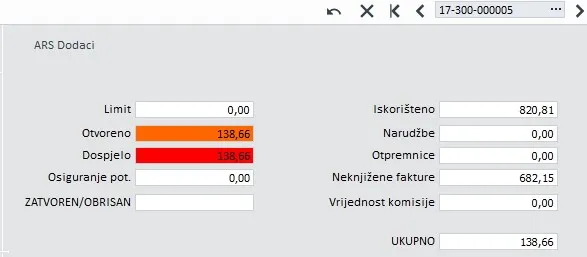
What it shows
ArsFinInfo gathers in one place what sales and accounting need to know about a customer before anything is delivered:
- open items and overdue receivables, as the result of posting outgoing invoices (IRA) and customer payments,
- the customer’s limit and how much of it is used,
- posted and unposted invoices,
- confirmed orders and delivery notes,
- internal notes about the customer, for example a payment agreement or a warning from colleagues.
Why it is useful
The decision to deliver, or to approve extra goods, is made at the moment a document is created. When the customer’s financial data is visible immediately, sales do not deliver to customers who are over their limit or late with payment, and do not have to open other reports or call accounting.
ArsFinInfo works well together with automatic payment reminders: one warns sales, the other reminds the customer.
More custom development and solutions
Frequently asked questions
Where is ArsFinInfo shown?
Right on a quote or issue document in PANTHEON, so the salesperson does not have to open other reports.
What can be seen about the customer?
Open items and overdue receivables, the limit, posted and unposted invoices, confirmed orders, delivery notes and internal notes about the customer.
Let’s talk about your system
Tell us what you need to connect or automate. A short call is enough to estimate the solution and cost.